Set up using AI
“ellmer” (ellmer.tidyverse.org) is a recent addition to the tidyverse that provides interfaces to frontier models like OpenAI’s ChatGPT, Anthropic’s Claude, Google’s Gemini, and, DeepSeek, etc. Here I am using the Llamma because it’s free. We can download it to local machine. We can also download DeepSeek-R1 to local machine.
To use ChatGPT, Claude or other API’s, you need to have an API key. You can get one from the respective website. Then you’ll need to modify your .Rprofile to include the API key. For example, if you are using ChatGPT, you can set the environment:
Sys.setenv("OPENAI_API_KEY" = "your_openai_api_key_here") or you can also add the following line to your .Rprofile, so that every time you start R, it will automatically set the API key.
usethis::edit_r_profile()## ☐ Edit '/home/xao/.Rprofile'.## ☐ Restart R for changes to take effect.Then add the following line to your .Rprofile, replacing “
OPENAI_API_KEY =
Either way is fine.
To download AI models to local machine, you can use “ollama” to download the model. For example, to download the Llamma model, you can use the following command: “ollama pull llama3.1” which will download llama3.1 to your local machine. You can also download other models like llama 3.2, and DeepSeek-R1. For llama, llama3.3 is the largest model, with 70B. llama3.2 is 3B and llama3.1 is 8B. DeepSeek-R1 is 7B. There are bigger models. For example, DeepSeek full version is 671B, the size is 404GB.
use mall
There is another package which is easy to use if you are only interested in some specific analysis. It’s called “mall”. It is easy to use for sentiment analysis, text summarization, entity extraction, or translation.
Here we start with an example of sentiment analysis.
This data is from https://juliasilge.com/blog/animal-crossing/
We try to do the same with llama.
library(tidyverse)## ── Attaching core tidyverse packages ──────────────────────── tidyverse 2.0.0 ──
## ✔ dplyr 1.1.4 ✔ readr 2.1.5
## ✔ forcats 1.0.0 ✔ stringr 1.5.1
## ✔ ggplot2 3.5.1 ✔ tibble 3.2.1
## ✔ lubridate 1.9.4 ✔ tidyr 1.3.1
## ✔ purrr 1.0.4
## ── Conflicts ────────────────────────────────────────── tidyverse_conflicts() ──
## ✖ dplyr::filter() masks stats::filter()
## ✖ dplyr::lag() masks stats::lag()
## ℹ Use the conflicted package (<http://conflicted.r-lib.org/>) to force all conflicts to become errorslibrary(readxl)
library(glue)
library(gt)
user_reviews <- readr::read_tsv("https://raw.githubusercontent.com/rfordatascience/tidytuesday/master/data/2020/2020-05-05/user_reviews.tsv")## Rows: 2999 Columns: 4
## ── Column specification ────────────────────────────────────────────────────────
## Delimiter: "\t"
## chr (2): user_name, text
## dbl (1): grade
## date (1): date
##
## ℹ Use `spec()` to retrieve the full column specification for this data.
## ℹ Specify the column types or set `show_col_types = FALSE` to quiet this message.user_reviews %>%
count(grade) %>%
ggplot(aes(grade, n)) +
geom_col(fill = "midnightblue", alpha = 0.7)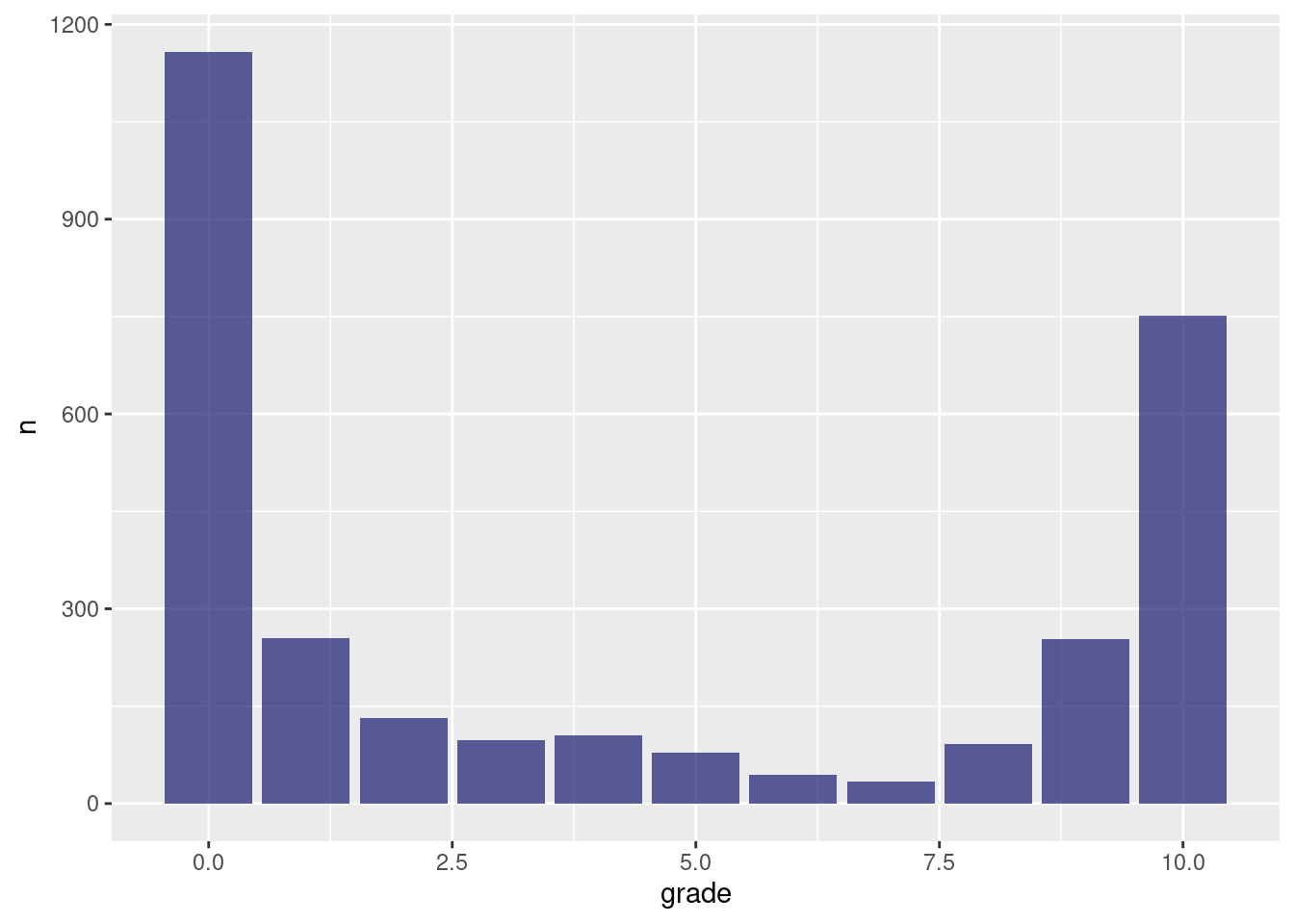
glimpse(user_reviews)## Rows: 2,999
## Columns: 4
## $ grade <dbl> 4, 5, 0, 0, 0, 0, 0, 0, 0, 0, 1, 0, 0, 0, 0, 0, 0, 0, 0, 0, …
## $ user_name <chr> "mds27272", "lolo2178", "Roachant", "Houndf", "ProfessorFox"…
## $ text <chr> "My gf started playing before me. No option to create my own…
## $ date <date> 2020-03-20, 2020-03-20, 2020-03-20, 2020-03-20, 2020-03-20,…We do sentiment analysis with on “text” column.
library(mall)
llm_use("ollama", "llama3.1", seed = 100, .silent = TRUE)

df_sent <- user_reviews |>
  head() |>
  llm_sentiment(col=text)

df_sent
## # A tibble: 6 × 5
## grade user_name text date .sentiment
## <dbl> <chr> <chr> <date> <chr>
## 1 4 mds27272 My gf started playing before me. No … 2020-03-20 negative
## 2 5 lolo2178 While the game itself is great, real… 2020-03-20 negative
## 3 0 Roachant My wife and I were looking forward t… 2020-03-20 negative
## 4 0 Houndf We need equal values and opportuniti… 2020-03-20 negative
## 5 0 ProfessorFox BEWARE! If you have multiple people… 2020-03-20 negative
## 6 0 tb726 The limitation of one island per Swi… 2020-03-20 negativeNow let’s see how we do entity extraction.
df_entity <- user_reviews |>
  head() |>
  llm_extract(col=text,  c(topic="topic", feelings="feelings"), expand_cols = TRUE)

glimpse(df_entity)
## Rows: 6
## Columns: 6
## $ grade <dbl> 4, 5, 0, 0, 0, 0
## $ user_name <chr> "mds27272", "lolo2178", "Roachant", "Houndf", "ProfessorFox"…
## $ text <chr> "My gf started playing before me. No option to create my own…
## $ date <date> 2020-03-20, 2020-03-20, 2020-03-20, 2020-03-20, 2020-03-20, …
## $ topic <chr> "console gaming frustrations ", "topic ", "local multiplaye…
## $ feelings <chr> " disappointment", " feelings\ngame ", " frustration", " fru…Here “llm_use” is to specify the model, and other options.
“mall” is just a wrapper for the backend llm models. We can do the same with “ellmer”.
use ellmer
library(ellmer)
#
# gen_sent <- function(text) {
#   chat <- chat_ollama(
#     model = "llama3.1",
#     system_prompt = "You are a sentiment classifer",
#   )
#   chat$chat(glue("Classifiy the sentiment as 'positive', 'negative', or 'neutral' from the following text: {text}.  "))
# }

# df_ai <- user_reviews |>
#   head() |>
#   group_by(user_name) |>
#   mutate(sent = gen_sent(text))
# type_sentiment <- type_object(
#   "Classifiy the sentiment as 'positive', 'negative', or 'neutral'.",
#   sent_type = type_enum("The sentiment", c("positive", "negative", "neutral"))
# )
# df_ai <- user_reviews |>
#   head() |>
#   group_by(user_name) |>
#   mutate(sent = chat$extract_data(text, type=type_sentiment))


#   First define the chat model
chat <- chat_ollama(
  model = "llama3.1",
  seed = 123,
  echo = "none",
  api_args = list(temperature = 0.0)
  )
# now define a type object, here I ask it to be sentiment classifier
type_sentiment <- type_object(
   "Classifiy the sentiment as 'positive', 'negative', or 'neutral'.",
   sent_type = type_enum("The sentiment", c("positive", "negative", "neutral"))
 )

# notice I used group_by(user_name).  without it, it seems AI is using all history as input.
df_ai <- user_reviews |>
  head() |>
  group_by(user_name) |>
  mutate(sent = chat$extract_data(text, type=type_sentiment)) |>
  unnest(sent)


glimpse(df_ai)
## Rows: 6
## Columns: 5
## Groups: user_name [6]
## $ grade <dbl> 4, 5, 0, 0, 0, 0
## $ user_name <chr> "mds27272", "lolo2178", "Roachant", "Houndf", "ProfessorFox"…
## $ text <chr> "My gf started playing before me. No option to create my own…
## $ date <date> 2020-03-20, 2020-03-20, 2020-03-20, 2020-03-20, 2020-03-20, …
## $ sent <chr> "negative", "negative", "negative", "neutral", "negative", …# if we'd like to do parallel processing, we can use multidplyr
# # library(multidplyr)
# # cluster1 <- new_cluster(10)
# # data <- user_reviews |>
# # group_by(user_name)
# #
# # data_partitioned <- data %>%
# # partition(cluster1)
# #
# # cluster_copy(cluster1, "draw_driver")
# #
# # cluster_library(cluster1, c("purrrlyr", "dplyr", "tidyverse", "tidyr","purrr", "multidplyr", "data.table", "haven"))
# param <- data_partitioned %>%
# group_by(d_seqid) %>%
# do(draw_driver(.)) %>%
# collect() Here note I set seed and set temperature to 0. I am trying to make the results reproducible.
# type_summary <- type_object(
#   "Summary of the review",
#   person = type_string("who is mentioned in the review, give me the names"),
#   topic = type_string("topic of the review"),
#   sentiment = type_string("Article's sentiment, one of 'positive', 'negative', or 'neutral'")
# )
#
# type_summary <- type_object(
#   person = type_string("who is mentioned in the review"),
#   topic = type_string("topic of the review"),
#   sentiment = type_string("Article's sentiment, one of 'positive', 'negative', or 'neutral'")
# )

type_summary <- type_object(
  "Summary of the article",
  author = type_string("name of the article author"),
  topic = type_string("topic of the article"),
  feelings = type_string("use only one word to summarise the general feeling of the article")
)

df_ai <- user_reviews |>
  head() |>
  group_by(user_name) |>
  mutate(new=as_tibble(chat$extract_data(text, type=type_summary))) |>
  unnest(new)


glimpse(df_ai)
## Rows: 6
## Columns: 7
## Groups: user_name [6]
## $ grade <dbl> 4, 5, 0, 0, 0, 0
## $ user_name <chr> "mds27272", "lolo2178", "Roachant", "Houndf", "ProfessorFox"…
## $ text <chr> "My gf started playing before me. No option to create my own…
## $ date <date> 2020-03-20, 2020-03-20, 2020-03-20, 2020-03-20, 2020-03-20, …
## $ author <chr> "user", "user", "user", "You", "Nintendo", "User"
## $ topic <chr> "Nintendo Switch Game Limitations", "Nintendo Switch Game L…
## $ feelings <chr> "frustration, disappointment", "frustration, disappointment"…type_summary <- type_object(
"Summary of the article",
author = type_string("name of the article author"),
topic = type_string("topic of the article"),
feelings = type_string("use only one word to summarise the general feeling of the article")
)
chat <- chat_ollama(
model = "llama3.2",
seed = 123,
echo = "none",
api_args = list(temperature = 0.0)
)
df_ai <- user_reviews |>
head() |>
group_by(user_name) |>
mutate(new=as_tibble(chat$extract_data(text, type=type_summary))) |>
unnest(new)
glimpse(df_ai)## Rows: 6
## Columns: 7
## Groups: user_name [6]
## $ grade <dbl> 4, 5, 0, 0, 0, 0
## $ user_name <chr> "mds27272", "lolo2178", "Roachant", "Houndf", "ProfessorFox"…
## $ text <chr> "My gf started playing before me. No option to create my own…
## $ date <date> 2020-03-20, 2020-03-20, 2020-03-20, 2020-03-20, 2020-03-20, …
## $ author <chr> "Disappointed Player", "Disappointed Player", "Disappointed…
## $ topic <chr> "Island Sharing Issue", "Island Sharing Issue in Animal Cros…
## $ feelings <chr> "Frustrated", "Frustrated", "Frustrated, Angry", "concerned"…type_summary <- type_object(
"Summary of the article",
author = type_string("name of the article author"),
topic = type_string("topic of the article"),
feelings = type_string("use only one word to summarise the general feeling of the article")
)
chat <- chat_ollama(
model = "DeepSeek-R1",
seed = 123,
echo = "none",
api_args = list(temperature = 0.0)
)
df_ai <- user_reviews |>
head() |>
group_by(user_name) |>
mutate(new=as_tibble(chat$extract_data(text, type=type_summary))) |>
unnest(new)
glimpse(df_ai)## Rows: 6
## Columns: 7
## Groups: user_name [6]
## $ grade <dbl> 4, 5, 0, 0, 0, 0
## $ user_name <chr> "mds27272", "lolo2178", "Roachant", "Houndf", "ProfessorFox"…
## $ text <chr> "My gf started playing before me. No option to create my own…
## $ date <date> 2020-03-20, 2020-03-20, 2020-03-20, 2020-03-20, 2020-03-20, …
## $ author <chr> " Nintendo", "Ninten...", "W", "Wright", "John", "Ninten..."
## $ topic <chr> " Nintendo Switch Online Islands Feature", " Nintendo Switc…
## $ feelings <chr> "frustrated and disappointed", "frustrated and disappointed"…We have seen a few examples of using different models/engines for the same task, for example, get the author or mood. There are a few issues: First, the speed. Seems it takes a while to process the text analysis. How to parallelize the task? Second, how to resolve the issue of reproducibility? Right now I am setting a seed and set the temperature to 0. Third, how to make the results more consistent. That is, different models give different answers.